Local SEO
What Local SEO is
Where your business shows up on Google Maps, and what to do about it each week, in plain words.
Not on Local SEO yet? It is a $39/month add-on to any Grandranker plan, and also available as a plan of its own. If you already have it, this button opens your Local SEO home.
Add Local SEO to my planWhen someone nearby searches Google for what you do, Google shows a map with three businesses on it (people in the trade call those three the Map Pack). Local SEO is the part of Grandranker that tells you whether one of those three is you, and what to do this week if it is not.
It is built for businesses that customers find on a map: plumbers, dentists, restaurants, salons, roofers, clinics, anyone with a Google listing and an area they serve. You do not need to know anything about search engines to use it. Every screen speaks about your listing, your reviews and the searches your customers type.
What it does
Grandranker checks Google Maps from many spots around your business, the way a customer a few streets away would see it, and turns what it finds into a handful of numbers and a short list of tasks.
The sidebar has six places to go, in this order:
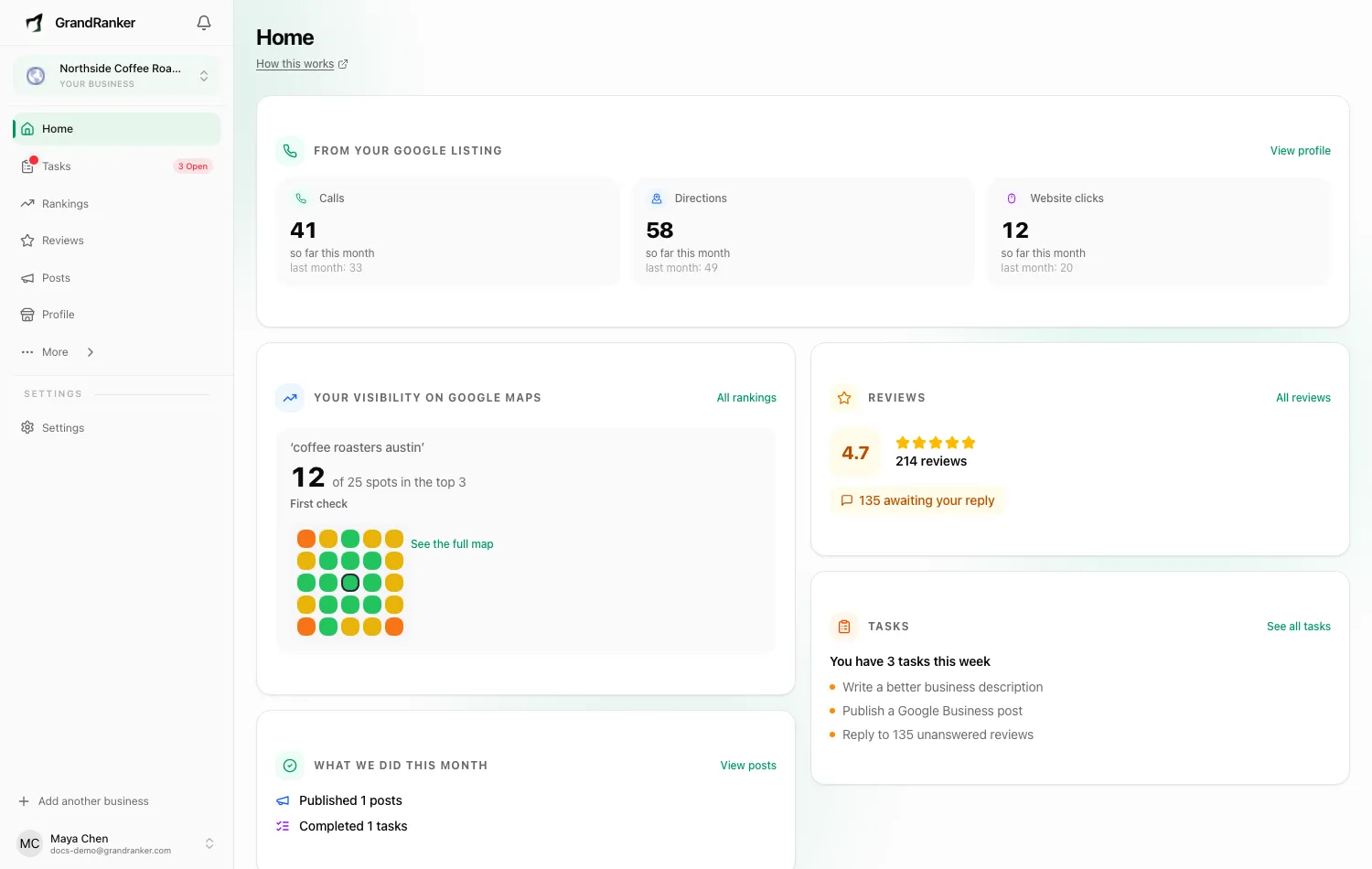
- Home is the week in one screen. Across the top, Google's own numbers for your listing: calls, direction requests and website clicks, this month against last month. Under that, where you stand on the map for each search you check, for example "12 of 25 spots in the top 3" with "Up 3 since Sep 10, 2026" beside it and a small coloured grid of the spots we reached. Then what got done this month, your reviews and how many are waiting on a reply, and the first three tasks on this week's list.
- Tasks is this week's list in full, with a bar counting what you have finished, a rough size on each task, and a button that does it or opens the right screen.
- Rankings shows the map itself, spot by spot, for each search you have checked, and which businesses were seen above you.
- Reviews gathers your Google reviews in one place, drafts a reply to each in your own voice, and gives you a link and a QR code to ask customers for more. It can also answer five-star reviews for you, if you switch that on.
- Posts writes and publishes updates, offers and events to your Google listing, so it never looks abandoned.
- Profile is your Google listing as Google sees it, editable in place, with a watch that emails you if anything changes without you.
Two emails keep the same work going when you are not looking: one on Monday with this week's tasks, and one on the 4th of each month with your month on Google (where you stand, what changed, calls and directions against the month before, reviews gained, what got done). Both carry a one-click unsubscribe link.
Most pages have a small How this works link under the title that opens the matching page of these docs.
Under More in the sidebar there are three more pages: Businesses above you (who Google showed instead of you and how they are moving), Searches (the searches we check for you, with your position on the map and on your website for each), and Directories (where your business is listed across the web).
What it does not do
Grandranker does not decide who Google shows. Nothing here promises you a position, and no task on your list claims it will move you up. What you can control is whether your listing is complete, active and answered, and that is what the weekly tasks keep in shape.
Grandranker also never changes your listing on its own. Services and descriptions go to Google only when you tick them and press the button. If someone else changes your listing, you get an email and you choose whether to keep the change or put your value back.
What you need
- A business on Google Maps. Start by typing its name and town; Grandranker finds the listing and starts checking the map straight away, with no Google login.
- The Google account that manages the listing, when you are ready. Connecting it unlocks reviews, posts, photos, editing and the change watch. See Setup & Google Business Profile.
What it costs
Local SEO is included in the Local plan. On a content plan it is a $39/month add-on, with every feature included and nothing to configure. Either way one Google listing is included; each additional listing you switch on is $19 per month, and you see the total before anything is charged.
To add it, open Local SEO in the app: a plan without it sees the offer there, and a plan with it lands on Home.
Where to go next
- Setup & Google Business Profile: find your business, connect Google, pick your locations.
- Rankings & Map Pack: read the map, check a new search, see who was above you.
- Reviews & Posts: reply, ask for reviews, publish posts.
- Weekly tasks & watching for changes: the weekly list, what your listing is missing, and the change watch.
FAQ
Is this the same as ranking my website on Google?
No. This is about the map and your Google listing, which is what people see when they search for a service near them. Your website still matters, and the Searches page shows your website's position next to your map position for each search, but the tasks here are about the listing.
Will I see results straight away?
You see where you stand within minutes of your first map check. Changes to your listing take Google days to weeks to reflect, which is why the list is weekly and capped at ten tasks: steady, not frantic.
Can I use it for more than one business?
Yes. Each Google listing you switch on is checked on the map, watched for changes and given its own tasks, and you switch between them at the top of every page.
Still stuck? [email protected]