Account & Billing
REST API & Tokens
Create API tokens and use the Grandranker REST API.
Everything in the Grandranker dashboard (articles, keywords, content planning, rank tracking, AI visibility, webhooks and more) is also available over a REST API. This page covers creating a token and authenticating. Full endpoint reference: https://app.grandranker.com/docs.
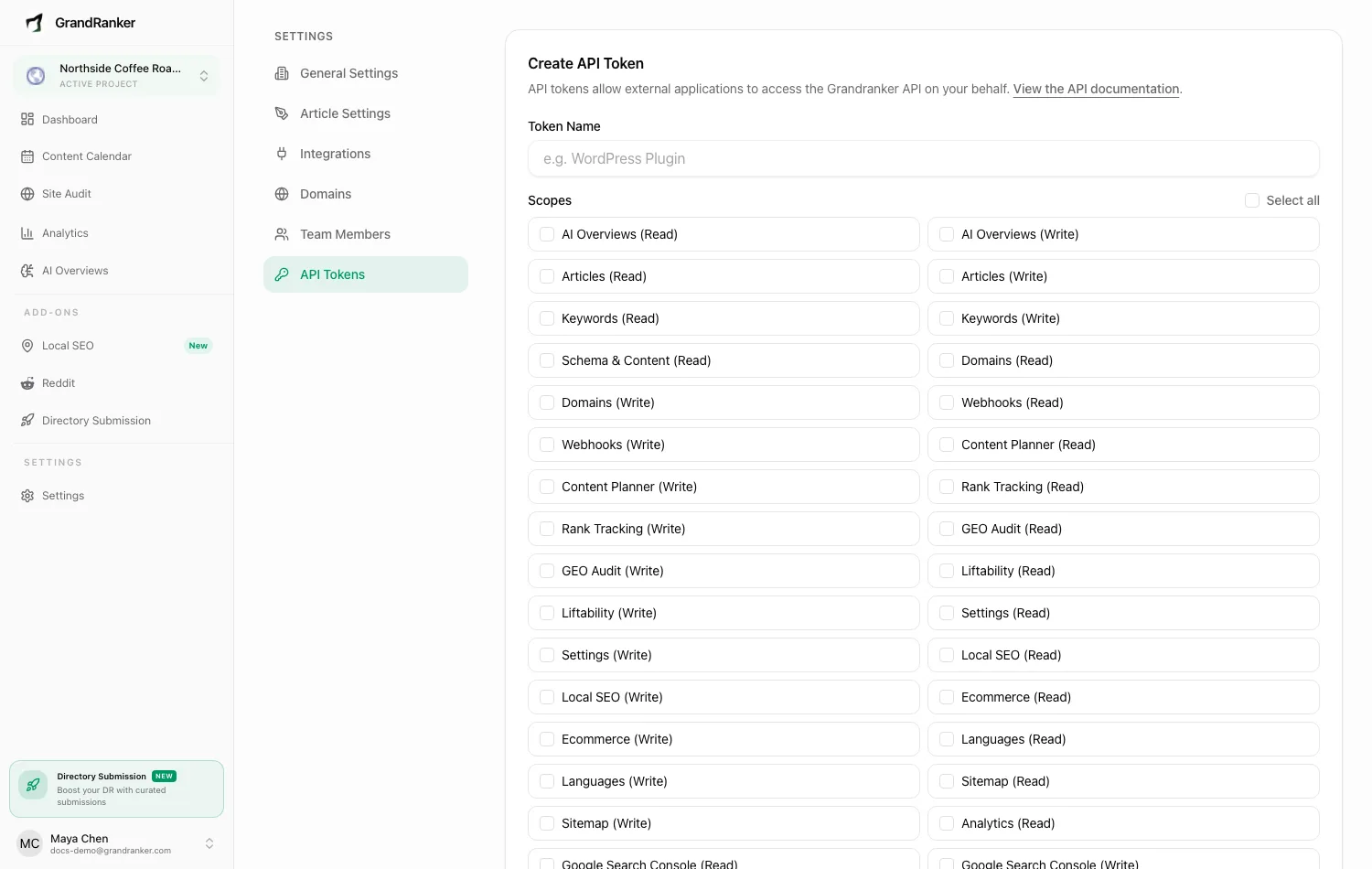
Creating an API token
- Go to Settings → API Tokens at
https://app.grandranker.com/settings/api-tokens. - Enter a Token Name in the Create API Token card.
- Pick the Scopes the token needs (Select all or individual scopes — at least one required).
- Click Create Token.
- Copy the token from the confirmation card. It won't be shown again.
Tokens don't expire. Active Tokens lists each one with creation date, scopes and last-used time. Revoke any time with the trash button — immediate, no undo.
Scopes gate access. Each endpoint requires a specific scope, e.g. articles:read, keywords:write, content-planner:read, webhooks:write. A token without the required scope gets 403 Token does not have the required scope. Grant only what the consuming app needs.
Authenticating
- Base URL:
https://app.grandranker.com/api/v1 - Auth header:
Authorization: Bearer <your token> - Website scoping: most endpoints need the
X-Domain-IDheader. Without it:400 X-Domain-ID header is required.List website IDs withGET /api/v1/domains.
curl https://app.grandranker.com/api/v1/me \
-H "Authorization: Bearer YOUR_API_TOKEN"
curl https://app.grandranker.com/api/v1/domains \
-H "Authorization: Bearer YOUR_API_TOKEN"
Rate limits and requirements
- Read and write endpoints: 60 requests per minute.
- Expensive operations (audits, generation): 10 requests per minute.
- Requires an active subscription — otherwise
402 Active subscription required to use the API. - Endpoints for features your plan doesn't include return an error until upgraded.
Connecting an AI agent (MCP)
Using Claude, ChatGPT or Claude Code? Connect with your Grandranker login instead of a token. See Claude & ChatGPT.
Grandranker ships an MCP server so AI agents (Claude, Cursor, others) can drive your account directly. The Connect an AI agent (MCP) card on the API Tokens page shows the endpoint (https://app.grandranker.com/mcp/grandranker) and a client config using the same bearer token:
{
"mcpServers": {
"grandranker": {
"url": "https://app.grandranker.com/mcp/grandranker",
"headers": { "Authorization": "Bearer YOUR_API_TOKEN" }
}
}
}
Available tools
Each tool needs the matching token scope, and it only reaches websites in your own workspace. Most tools take a domain_id, so start with list_domains.
| Tool | What it does |
|---|---|
list_domains |
List your websites and their IDs |
get_domain |
Get one website with its brand profile and article settings |
list_keywords |
List keywords with volume, difficulty, intent and status |
get_keyword |
Get one keyword with its latest rank and status |
add_keyword |
Add a keyword |
research_keywords |
Start AI keyword research (runs in the background) |
list_articles |
List articles with status and published state |
get_article |
Get one article with full content, scores and status |
get_article_social_posts |
Read the social captions already generated for an article |
score_article |
Get SEO, quality and readability scores |
generate_article |
Generate an article from a keyword (runs in the background) |
regenerate_article |
Rewrite an article using the current settings (runs in the background) |
edit_article |
Edit an article's fields |
publish_article |
Publish a completed article to your connected platform |
unpublish_article |
Unpublish an article back to draft |
get_ai_overview_visibility |
AI-search visibility across Google AI Overviews, AI Mode, ChatGPT, Perplexity, Claude and Gemini |
list_ai_overview_queries |
List monitored AI-search queries with their latest status |
get_rank_overview |
Rank-tracking summary and position distribution |
list_tracked_keywords |
Tracked keywords with current position and change |
get_keyword_rank_history |
Position history for one tracked keyword |
get_settings |
Read the business data, audience and writing instructions |
update_business |
Update business data |
update_audience |
Update target audience, ICP, pain points and competitors |
update_article_settings |
Update writing instructions and article settings (overwrites, doesn't append) |
list_api_endpoints |
List every REST endpoint the agent can call |
api_request |
Call any REST endpoint that has no dedicated tool |
generate_article, regenerate_article and research_keywords count against your plan limits and return right away. The agent then checks get_article or list_keywords until the result is ready.
Endpoint reference
The interactive docs at https://app.grandranker.com/docs cover every endpoint with parameters, example requests (bash/JavaScript/PHP) and responses, plus an OpenAPI 3 spec and a Postman collection.
To have Grandranker push data to you instead of polling, set up a webhook.
Still stuck? [email protected]