Local SEO
Reviews & Posts
Reply to reviews, ask for more, and publish posts to your Google listing.
Reply to Google reviews and publish posts to your listing from one place: the Reviews and Posts pages under Local SEO. Both need your Google account connected - see Setup & Google Business Profile.
Reviews
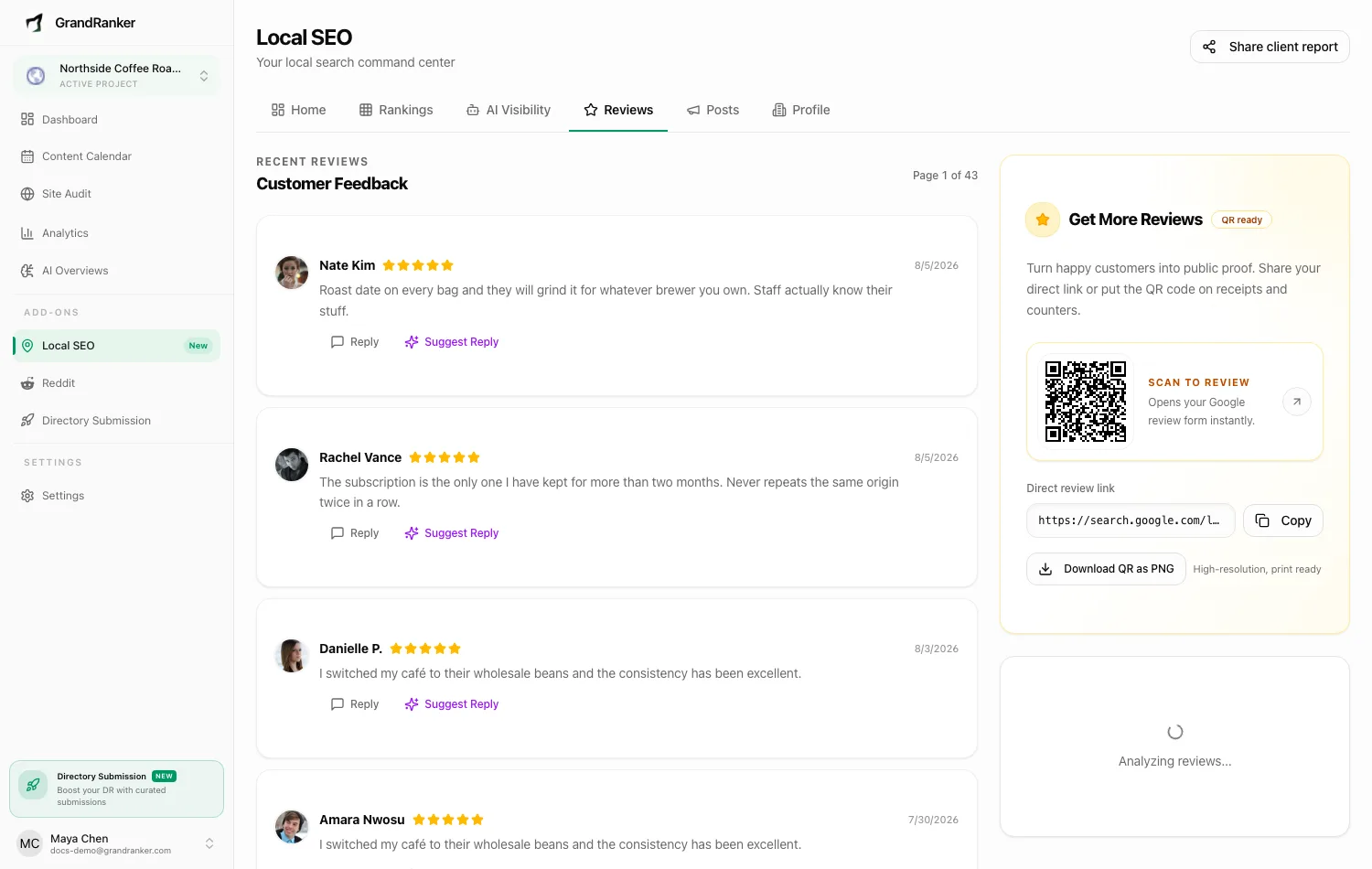
Reviews arrive from Google once a day. The top of the page says how the month is going, for example "7 new reviews this month, 12 in August", counted by the date Google gives each review. The page opens on reviews that still need a reply, lowest rating first, twenty to a page; the Needs a reply button carries the count, and All reviews shows everything. Each shows the reviewer's name, rating, comment and how long ago it was left.
Replying: press Draft a reply and Grandranker writes one matched to the rating and the way you speak to customers, or press Write my own for an empty box. Edit it, then Post reply on Google; nothing is posted until you press send.
Draft all replies drafts a reply to every unanswered review on the page in one go. No two read the same. Nothing is sent until you send it.
Answer reviews for me is the switch beside the list. On, it answers five-star reviews for you: only five stars, a day after they land so you can get there first, and at most five a day for a business. Anything less than five stars always waits for you, and the page says so when one is sitting there. The card counts what it sent this month and what is still left for you.
Before your first review: the page shows a worked example instead of an empty box, so you can see a review land, the reply we would draft and how it gets posted. While reviews are still coming across from Google it says so, and once everything has an answer it says that too, with the last few replies and who sent them.
Review Insights: a short summary of what customers say, and whether the mood is positive, mixed or negative. It needs written comments; ratings with no text cannot be summarised, and the card says so rather than staying empty.
Answering five-star reviews for you
Answer five-star reviews for me is a switch beside the inbox, and it is off until you turn it on.
With it on, Grandranker answers your happiest reviews so you can spend your time on the rest:
- Five stars only. Four and below are yours to answer.
- It waits a day before answering, so a reply never lands the same minute the review does, and it leaves anything older than a week to you.
- It answers at most five a day for one business, and ten a day across your whole account.
- It only answers reviews left after you switched it on. Nothing in your back catalogue is touched.
- It skips anything that needs a person: a review that asks a question, names a complaint, or is written in a language we cannot read. If the draft itself comes back with a link, an email address, a phone number or money off, that one comes to you instead.
Under the switch, a line counts how many it has sent this month. Turn it off whenever you like, and it stops at once.
Asking for reviews
Get More Reviews shows Your review link with a Copy button, and "We space them out so it looks natural" under the ask. Copy the link into a text, email or invoice. More ways to ask opens the rest: a QR code to put on a receipt or a counter, Download QR as PNG, and Print a review sheet for one A4 page with your business name, a neutral ask and the code.
Ask customers once they have left, a few at a time: a steady trickle of reviews looks natural to Google, a burst does not.
If the link cannot be built yet, the card says so in plain words: Google has not told us where your listing lives. Press Update from Google to fetch your listing again; it usually fixes it within a minute. A business you added by name, not yet linked to a Google account, shows Connect Google instead.
How many reviews you answer, how quickly new ones arrive, and whether the unhappy ones get a reply all count towards how complete your listing is.
Posts
Posts keep your listing looking open for business. How often you post, and how recently, count towards how complete your listing is.
Types: Update (the usual kind), Event (title plus start and end dates), Offer (title, optional coupon code and a link to redeem it).
Each post has a summary of up to 1,500 characters, an optional picture, and an optional Button on the post: Learn More, Book, Order, Shop, Sign Up or Call. All but Call take a link.
Writing one: press Write a post. The composer, Write a Google post, opens on the writing step (Step 1 of 2).
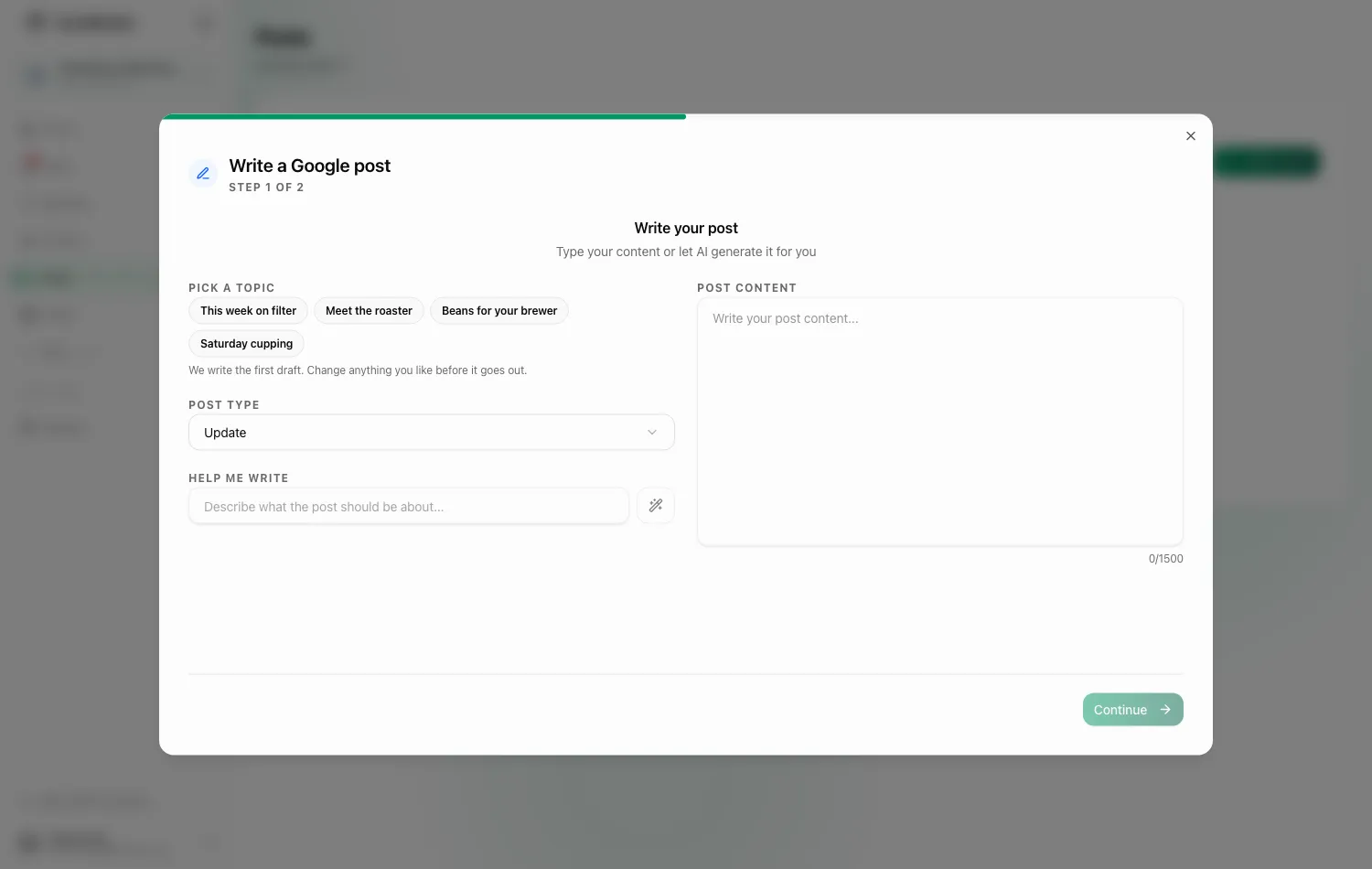
Short of ideas? Pick a topic offers a handful drawn from your own listing and the searches we check for you, and tapping one writes the first draft straight away. Otherwise write it yourself, or type a line under Help me write and Grandranker writes the post in your voice, within the limit, with no hashtags. Either way it is a first draft: change anything you like before it goes out. Then review it, add or generate a picture (at least 400×300 pixels), choose the button, and publish.
A phone number in the text: Google turns down posts with a phone number in them, and it only says so after the post has gone out. So the composer warns you first, naming the number, and the sentence carrying it is dropped before the post is sent. Use the Call button on the post instead - it rings the number on your Google profile.
Publishing: publish now or pick a date and time; scheduled posts go out on their own. Drafts and scheduled posts can be edited; published ones cannot.
When a post needs you: a post Google turned down, one that failed to send, or one whose scheduled time came and went an hour ago is flagged in a notice at the top of the list, so it is never buried under the posts that went out fine. Each line says what happened and offers the one button that fixes it: Publish again, Try again or Publish now.
A post that has gone to Google but that Google has not confirmed yet is marked Not confirmed yet, with a link to open your listing on Google and look.
Plans with the Content Planner get one more step at the start, to turn one of your published articles into a post that links back to it, and an Auto-post new articles switch above the list.
FAQ
Do replies and posts show up on Google right away?
Replies go straight to Google. Posts go out when you publish or at their scheduled time; Google may take a moment to display them.
Why don't I see any reviews?
They arrive with the daily update after you connect Google. Press Update from Google on the Profile page or check back later.
Can I manage reviews for more than one business?
Yes. Reviews and posts are per business; switch at the top of the page.
Not on Local SEO yet? It is a $39/month add-on to any Grandranker plan, and also available as a plan of its own. If you already have it, this button opens your Local SEO home.
Add Local SEO to my planStill stuck? [email protected]