Local SEO
Rankings & Map Pack
See where you show up on Google Maps, who was seen above you, and the tasks that would help.
The Rankings page under Local SEO is headed Where you show up on Google Maps. It answers three questions from the map checks Grandranker runs around your business: where you show up, who was seen above you, and which of your weekly tasks bear on it.
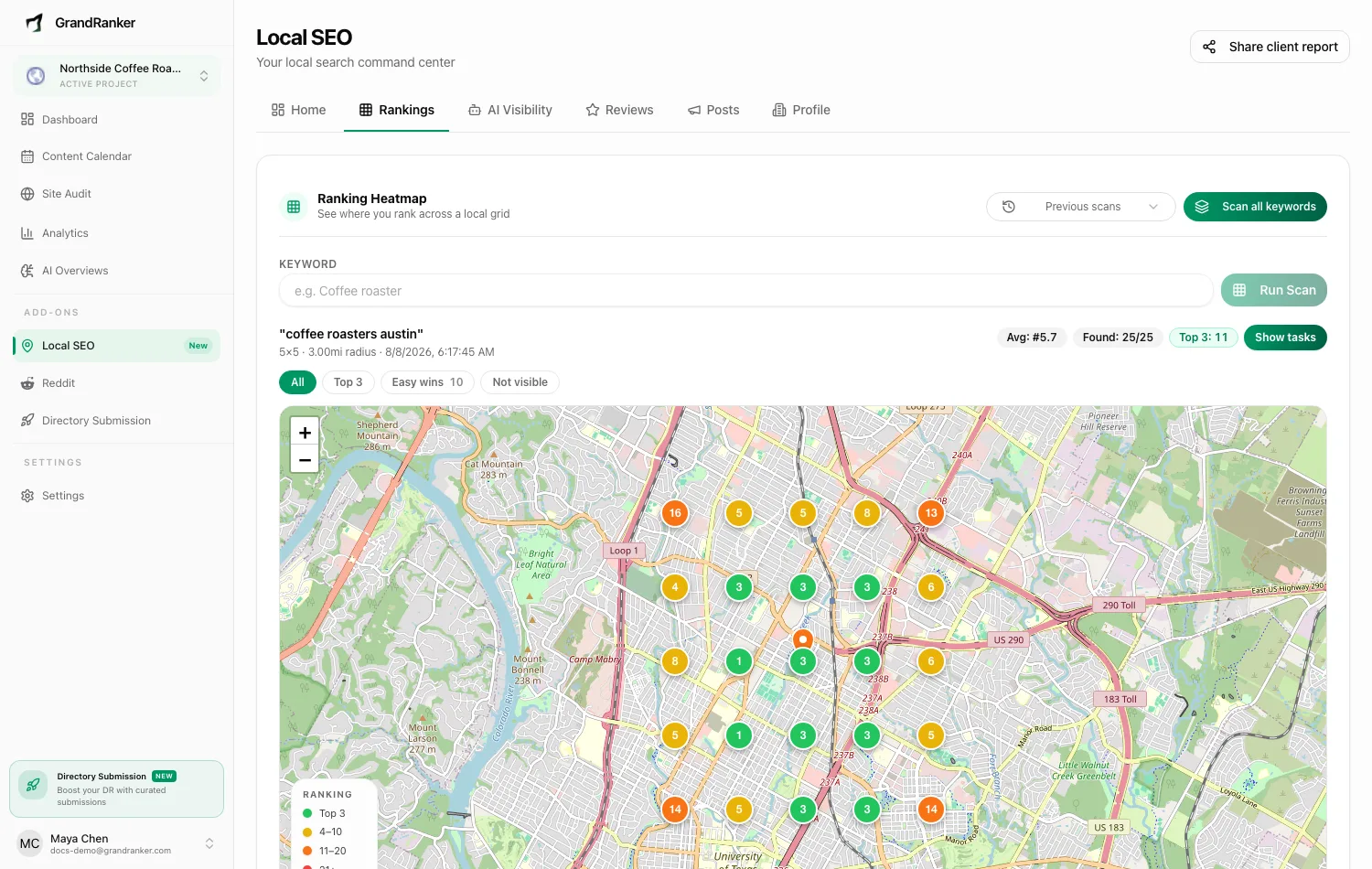
The line above the map
Every check opens with one line, for example: "In the top 3 at 12 of 25 spots - up 3 since Sep 10, 2026 - checked Sep 13, 2026".
- In the top 3 at 12 of 25 spots is this check.
- up 3 since Sep 10, 2026 compares it with the check before it, counting only the spots both checks actually reached, and only when the two used the same grid around the same centre, with the same spots skipped. With nothing comparable behind it, this part is simply left off.
- checked Sep 13, 2026 is the day the check ran.
Spots the check could not reach are counted separately as couldn't check, never as places you were missing.
The first time you open Rankings, three short bubbles point out the line, the map and the businesses seen above you.
The same figures open your Home page for every search you check, with a See the full map link that brings you here.
The Search terms panel on the left of the map switches the map between your searches. Each search you have already checked sits at the top as a card with a small 5x5 sketch of its own map - the same colours as the pins, north at the top - so you can see at a glance which searches are going well before you open any of them. The card also shows your average position and how many spots were in the top 3, and the round arrow button checks that search again. Underneath, Not checked lists every other search we know about, with what Google says about how often it is searched and a Check button; the price in spots is stated over the list. The line, the map and the lists below always describe the same check.
Check a search
- Under Check a search on Google Maps, type a search your customers use (for example "plumber" or "dentist near me") and press Check the map. Once there is a map on screen the form folds away behind a Check another search button, so the result gets the room. Until then it stays open, because a new business should never have to hunt for it.
- Grandranker looks at Google Maps from a grid of spots (3×3, 5×5 or 7×7) up to 1, 3, 5 or 10 miles out from your business. The map reads Checking spots on the map... while it runs, usually a couple of minutes, sometimes longer when we are busy.
- Each pin shows your position at that spot. The legend reads: Top 3, 4th-10th, Below 10th (in two shades) and Not found, plus Couldn't check for spots the check never reached, drawn as a dashed "?".
Above the pins, the check line reads in plain words: how many spots and how far out ("25 spots, up to 3 miles out"), then Usually 6th (your typical position where you were found), Seen at 25 of 25 spots, In the top 3 at 12 spots, and, when it applies, how many spots couldn't be checked.
Filters: All · Top 3 · Almost in the top 3 (positions 4 to 10) · Not found.
Adjust the check area
If part of the grid sits over land nobody searches from (fields, a river, an industrial park), those spots drag your numbers down for no reason. Click Adjust area at the top right of the map to change where the check looks.
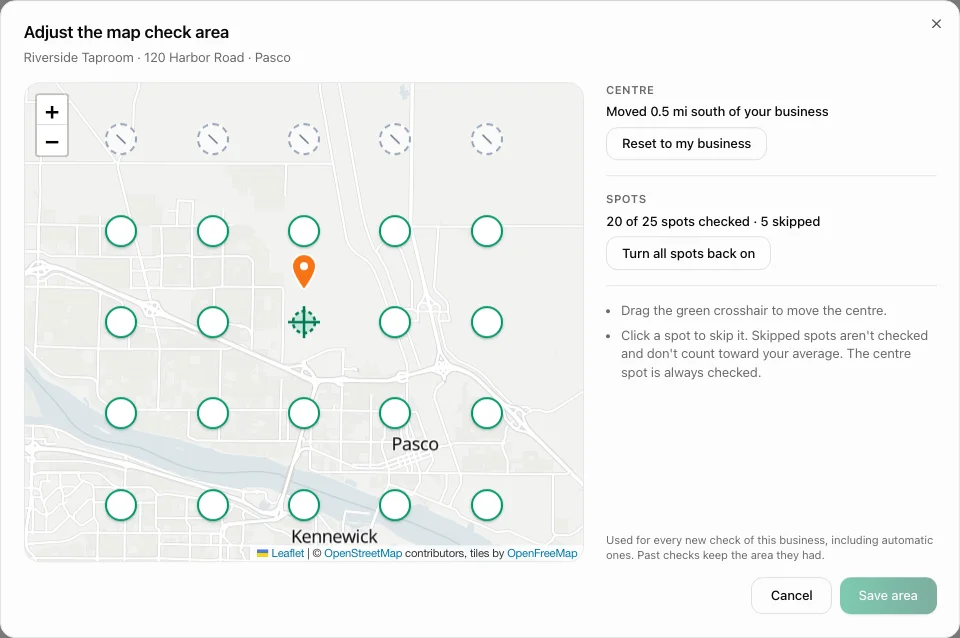
- Drag the green crosshair to move the centre, for example south of a store that sits on the edge of town. The panel says how far you moved it, such as "Moved 0.6 mi south of your business". The centre can sit up to 10 miles from your business.
- Click a spot to skip it. Skipped spots are drawn dashed and struck through. They are not checked and do not count toward your average, your top 3 count or any comparison. The centre spot is always checked, and at least 9 spots have to stay on.
- Save area keeps it for that business. Every new check uses it, including the automatic re-checks. Reset to my business and Turn all spots back on undo it.
Past checks keep the area they were run with, so the first check after a change starts a fresh comparison. On the map, the 5x5 sketches and the legend, skipped spots read Skipped, not checked.
What one pin tells you
A pin that moved since the last comparable check carries a small badge: a green arrow up, a red arrow down.
Click any pin and it opens with your position there, "Was 5th on Sep 10, 2026" when there is an earlier check to compare, and the businesses Google showed at the top of that spot. Where you are outside the top 3, a How to rank higher here button opens a short panel: who ranks above you at that spot, what is different about them (reviews, rating, photos), and a link to See all tasks.
There is nothing to run by hand after the first check. Grandranker re-checks the searches you have starred about every 14 days and the rest about every 30, and Rankings always shows the newest completed check for each search.
Showing up less further out is normal: Google favours whoever is closest to the person searching. The gaps near the middle are the ones worth acting on.
If Google doesn't publish coordinates for your listing (common for service-area businesses), Grandranker centres the grid on your city and region instead, or you can enter a city manually.
Tasks that improve your ranking
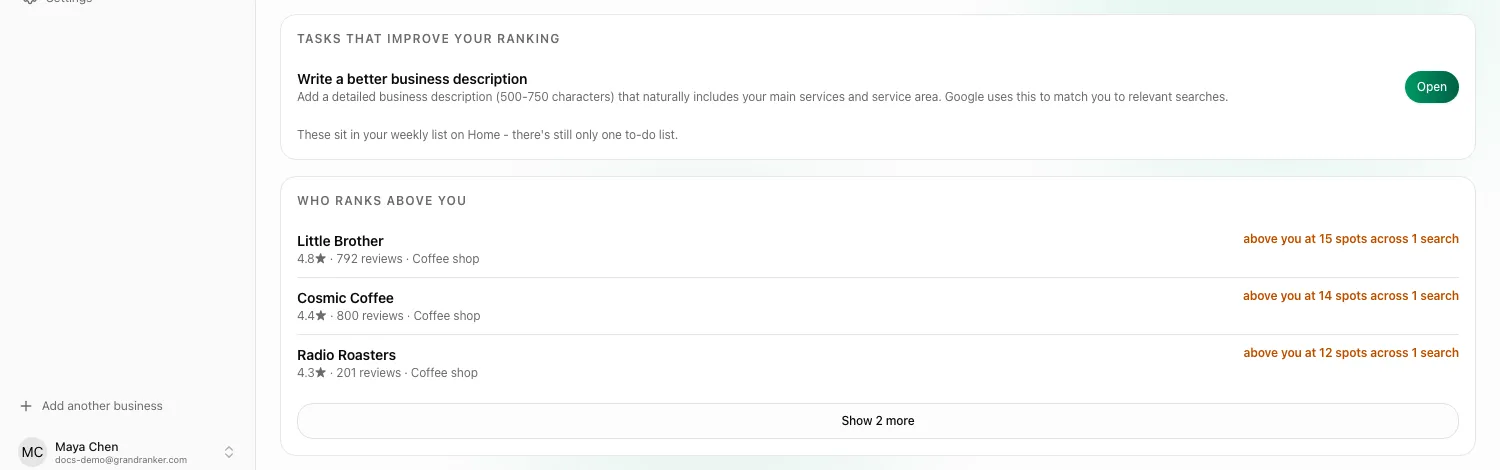
The block under the map shows the tasks from this week's list that bear on map position, such as adding photos, collecting reviews or checking your business types, with an Open button for each. Tasks that can only be done in Google's own editor open there instead. The closing line says it plainly: these sit in your weekly list on the Tasks page, and there is still only one to-do list.
Who ranks above you
Under that, Grandranker lists the businesses its checks recorded above you, each with rating, review count and category, and how often: "above you at 15 spots across 1 search". Three are shown, with Show 2 more for the rest. Where one of them has collected reviews since your last check, a line says so.
Only the top three results are stored at each spot, so this is what was observed, not a complete list of everyone above you: others may sit between them and you.
The Businesses above you page under More in the sidebar keeps the same list across all your checks, with how each business is moving. Before your first map check there is nothing to show there, so it says so and offers a Check the map button that brings you here.
Searches
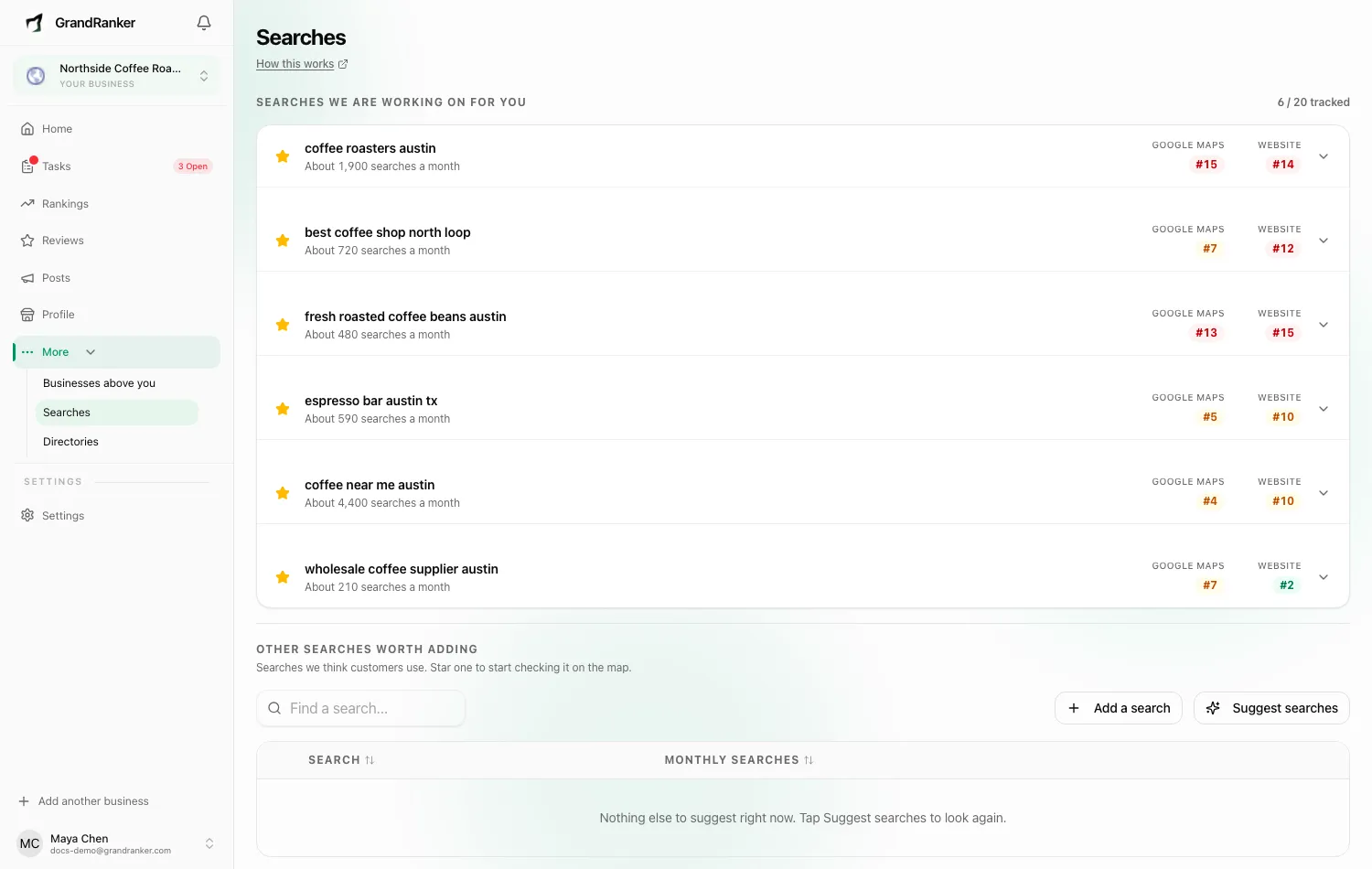
The Searches page under More in the sidebar is headed Searches. The searches you have starred sit at the top under Searches we are working on for you, with a count on the right reading "6 / 20 tracked". Each one shows two positions: Google Maps, where you sit among the businesses shown on the map, and Website, where your site appears in Google's ordinary results below the map, with the change since the last check. Under each search, "About 480 searches a month" is a rough size for it, and clicking the row opens the detail behind it.
- Add a search lets you type your own; Grandranker checks up to 20 searches on the map at a time.
- Suggest searches finds ones we think your customers use. Star one to start checking it; unstar it to stop.
- Other searches worth adding lists suggestions you have not starred yet, so nothing appears twice.
Agency accounts on the tabbed layout keep the full research table, with volume, difficulty, intent and movement, and the trend and competitor charts on their Rankings tab.
FAQ
How long does a check take?
A 5×5 check looks at 25 spots, usually a couple of minutes, sometimes longer when we are busy.
Why "Not found" at some spots?
Maps results are distance-sensitive, so this is normal for competitive searches further from your business. Start with the spots near the middle and the Almost in the top 3 filter. A dashed "?" pin is different: the check could not reach that spot, and it is left out of every count.
Can I delete old checks?
Not on the Rankings page: it always shows the newest completed check for each search.
Can I compare two checks?
The line above the map does it for you, against the check just before this one, on the spots both checks reached. Each pin carries its own up or down badge for the same comparison, and says "Was 5th on Sep 10, 2026" when you click it. There is no side-by-side screen to open: the comparison is drawn on the map you are already looking at.
Can I leave out empty land around my business?
Yes. Use Adjust area on the map to move the centre or skip spots. See Adjust the check area.
Which location do checks use?
The main one by default. Switch businesses at the top of the page to check others.
Not on Local SEO yet? It is a $39/month add-on to any Grandranker plan, and also available as a plan of its own. If you already have it, this button opens your Local SEO home.
Add Local SEO to my planStill stuck? [email protected]