Local SEO
Weekly tasks & watching for changes
The weekly list, what your listing is missing, and the watch that emails you when your listing changes without you.
Tasks in the sidebar is a short list of things to do on your Google listing this week. On the Profile page, a card at the top names what your listing is still missing, and Watch my listing for changes emails you when your listing changes without you, so you can decide whether to keep the change or put your value back.
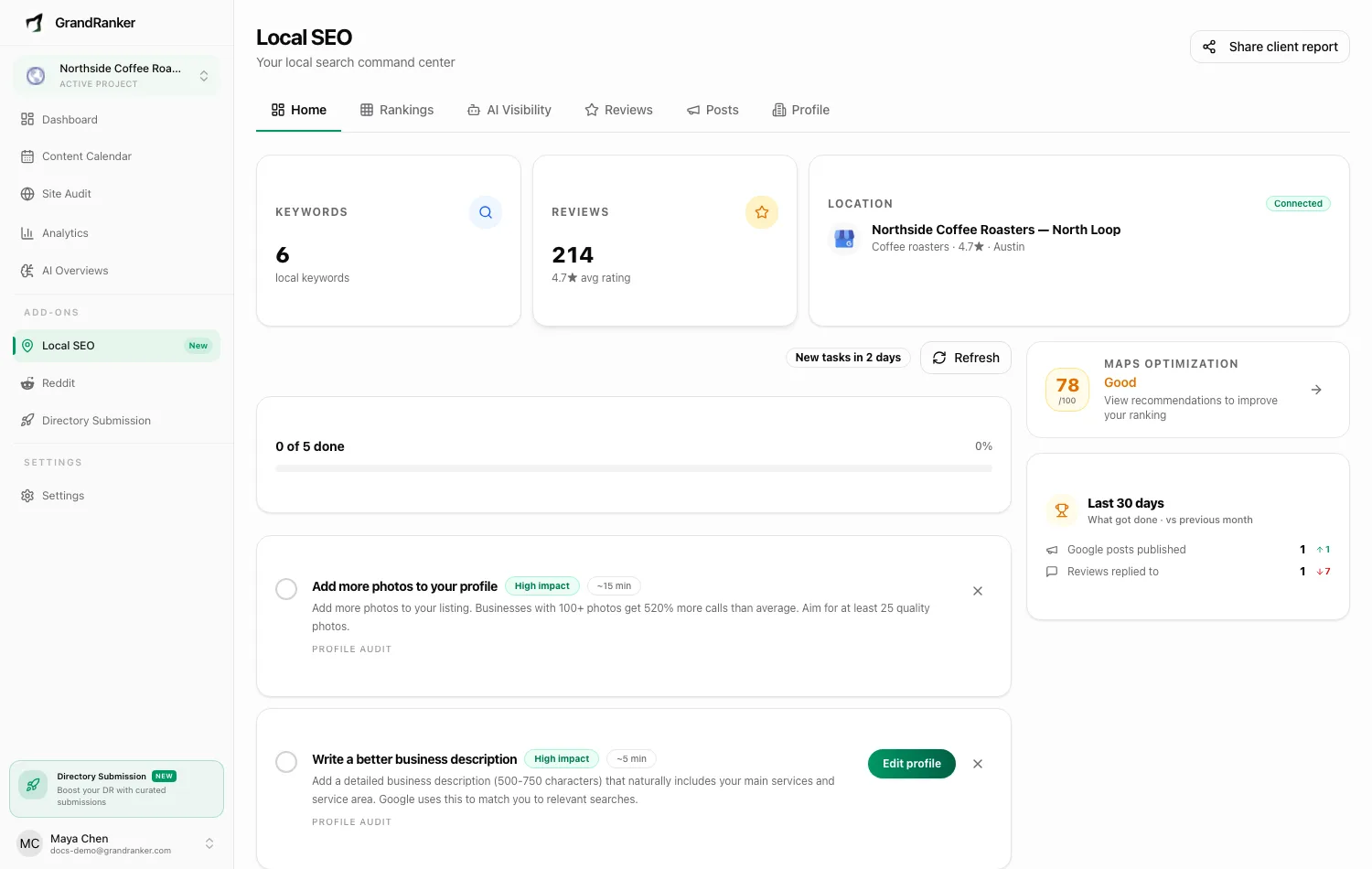
Your weekly tasks
Grandranker builds a weekly list of tasks for your Google listing, refreshed every Monday from your latest listing data. It has its own page, Tasks, second in the sidebar, and the sidebar carries a count of what is still open. Home shows the first three with a See all tasks link, so you can see what is waiting without leaving the front page.
The page opens with This week's tasks, a bar counting what you have finished, then the tasks themselves. Three show at a time. The rest are one press away, behind a button that counts them (Show 4 more), so the list never reads as a wall, and the week is capped at ten on purpose: changing a lot on your listing at once can get it flagged by Google. Each task carries a rough size, ~5 min, ~15 min or Takes longer, and a button that does it or opens the right screen. Tick the circle when it is done, and the one you finished stays on the page with a line through it and an Undo in case you ticked it too soon. Refresh rebuilds the list if you don't want to wait for Monday. With nothing left, the page reads "Nothing to do this week. No tasks waiting. Check back Monday."
Most tasks are done without leaving Grandranker. A photo task opens an upload box: pick a photo, say what it shows, and Grandranker sends it to your listing. Others open the Profile, Posts or Reviews page with the right thing already in front of you.
Tasks with a checklist
Most tasks Grandranker can finish for you, and those show a button that opens the right box here.
A few cannot, and those are the ones that need Google's own screens: attributes on a listing that carries none yet, and services on a listing with no business category set, where there is nothing for us to draft from. Rather than leave you to hunt for the right button over there, each of those comes with a numbered checklist, a tick box on every step, and a count above them showing how many steps are done.
Where Google already holds some attributes, the task reads Edit attributes and opens our own editor instead, the same one the Profile page has.
Ticks are saved as you make them, so you can stop halfway, close the page and come back to the same spot. Ticking the last step marks the whole task done, and unticking one puts it back on your list. Where a step names a button that is easy to miss, a Show me link under it opens a picture of the screen being described, and Hide picture folds it away again.
Add services
Where Grandranker knows the services businesses in your trade usually list, the services task does the work for you. Its button reads Add services and opens a pick-list here instead of sending you off to Google.
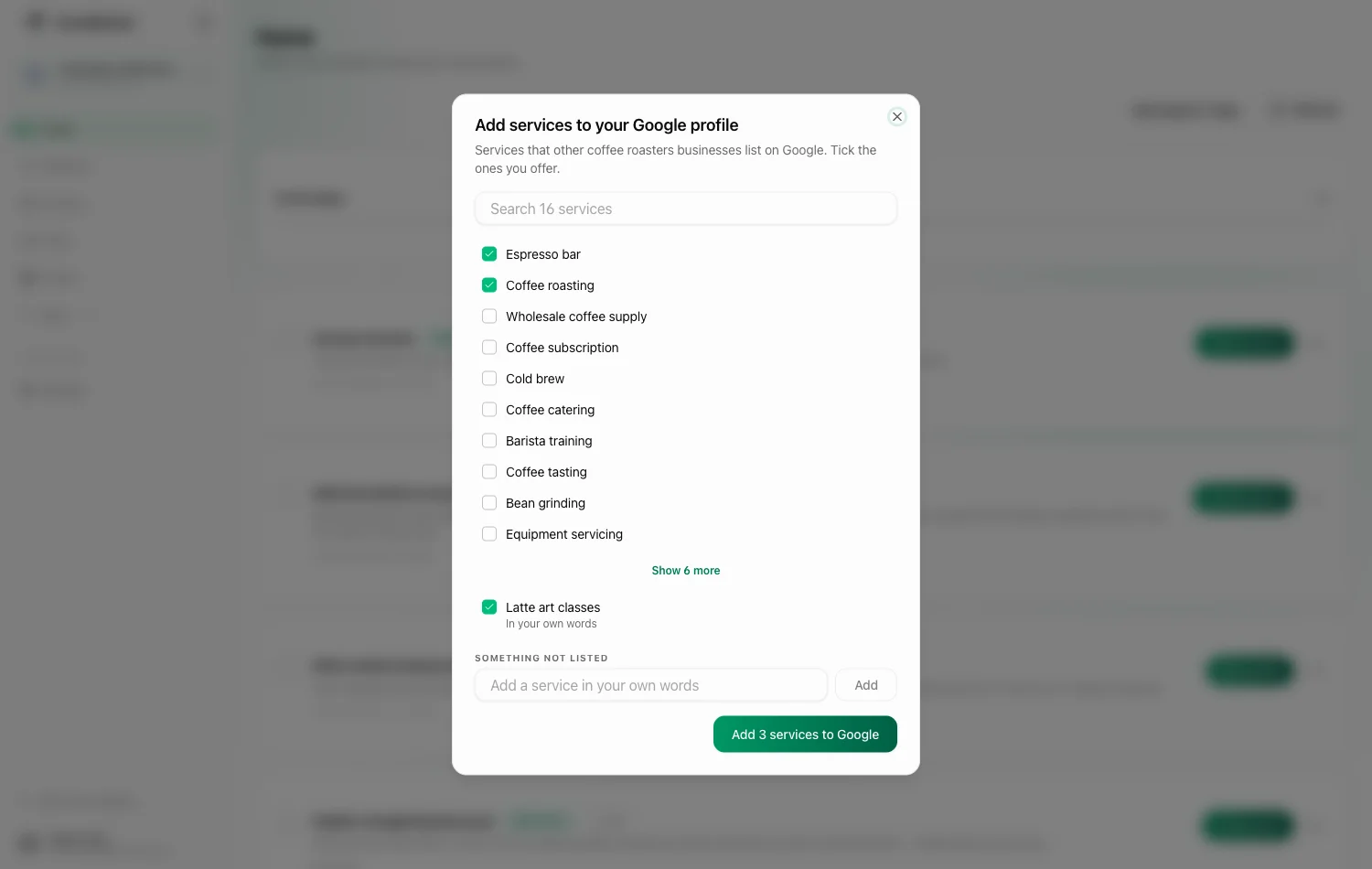
It offers the services other businesses in your trade already have on Google, most widely used first - so the top of the list is what is normal for your trade. Tick the ones you offer and press the button, which counts your picks: Add 3 services to Google. They go straight onto your Google Business Profile, and the services you already have are kept. Nothing is sent to Google until you tick it.
A long list opens with the twelve most widely used, a search box above them, and a link at the bottom to show the rest.
Not in the list? Type it under Something not listed and press Add: it goes onto your profile in your own words, alongside whatever you ticked. Google matches its own service names most readily, so use the list where it has what you need and your own words for the rest.
When your trade has no ready-made list
Google keeps its own wording for services, and it covers some trades far better than others. Where Grandranker does not yet know enough service names for your trade, the pick-list is written for you instead.
Grandranker drafts service names from your own listing - your business name, your categories, your description and the local searches you are tracking - and shows them with a short explanation of each, the same way as any other pick-list. Tick the ones you offer and they go onto your profile in those words. Nothing is drafted from another business's listing, and nothing is sent to Google until you tick it.
Because these are your own words rather than Google's, there is no search box; the list is short by design.
The one case with nothing to offer is a listing with no business category set on Google. That task keeps its Open in Google button, which opens a Google search for your business, and you work through the written steps there.
Describe your services
Listing a service by name is only half of it. Google also lets each service carry a short description, and a service with one gives Google more to match a search against.
Where any of your services has no description, the weekly task for it reads Write descriptions. It opens a list of exactly those services, each with a description already written for you from your own profile, in an editable box you can change before anything is sent. Tick the ones you are happy with and the button counts them: Write 2 descriptions to Google.
A description Google already holds is never touched. Grandranker only fills the empty ones, so a description you wrote yourself cannot be replaced by a written-for-you one. Google allows 300 characters, and the box counts down as you type.
What your listing is missing
Your weekly tasks come from the gaps in your Google listing, and the top of the Profile page names those gaps in plain words.
The card reads Your listing is missing a few things and lists only what is actually empty, each with a link straight to the place that fills it:
- Business description
- Photos, with where you stand: "you have 8, aim for 25"
- Other business types, the extra categories beyond your main one
- Phone number
- Website
- Business hours
With nothing missing, the card turns green and reads "Your listing looks complete." That is a measure of completeness, not a grade from Google, and the same gaps are what Monday's tasks are built from.
Reviews, posts and services count too, and those have tasks of their own rather than a line on this card: how many reviews you answer, how quickly new ones arrive, whether the unhappy ones get a reply, how often and how recently you post, and whether your services carry descriptions.
Recommendations
Concrete recommendations, most useful first, open from the weekly task that asks you to review your listing, on the Profile page. Some are done in place (listing fields sent to Google); others take you to Posts or Reviews. Refresh after changes for an updated set.
Photos of your work
On the Profile page, Photos of your work takes up to twenty photos in one go. Grandranker adds one of them to your Google listing on Tuesdays and Fridays until they are all up, so the listing always shows recent work, and the weekly "add a photo" task stays quiet while photos are waiting. The card shows how many are waiting and how many have been added; a waiting photo can be removed before it goes up.
Watch my listing for changes
Anyone can suggest edits to a Google listing, and Google sometimes applies them: a changed phone number or a swapped website can cost you calls without anyone noticing.
- On the Profile page, flip Watch my listing for changes for a business.
- Grandranker remembers the listing as it is now: name, phone, website, description, hours, categories.
- Every time it updates from Google, at least daily, it compares Google's values with what it remembered.
When something has changed, it is held under Changes we noticed and you get an email showing what it was and what it is now. Nothing is changed back until you decide. Choose Undo this change to put your value back on Google, or Keep it to accept the new one from now on. When nothing has changed, the card reads "No changes made without you. We check every time we update from Google."
Grandranker never reverts a change on its own. Google's rules for tools like this one forbid automatically undoing changes Google makes, and require you to be consulted on each one - the email is that consultation.
Edits you make through Grandranker update what it remembers, so the watch never fights your own changes.
FAQ
Will Grandranker change my Google listing without asking?
No. Add services and Write descriptions send only what you ticked, only when you press the button, and keep what your listing already has. The change watch puts a value back only when you press Undo this change.
Does the watch block changes from happening?
No, Google doesn't allow that. It notices a change after the fact and tells you the same day, and a wrong value is live until you press Undo this change.
Which fields are watched?
Name, phone, website, description, hours, categories.
Why can't a change be undone?
Some fields can't be written back to Google by a tool like this one - change those on Google directly.
How often should I press Refresh on Tasks?
After any real change to your listing: new photos, review replies, fresh posts. Otherwise a fresh batch arrives on its own every Monday.
Not on Local SEO yet? It is a $39/month add-on to any Grandranker plan, and also available as a plan of its own. If you already have it, this button opens your Local SEO home.
Add Local SEO to my planStill stuck? [email protected]