Content Engine
Languages
Generate and publish content in 133+ languages.
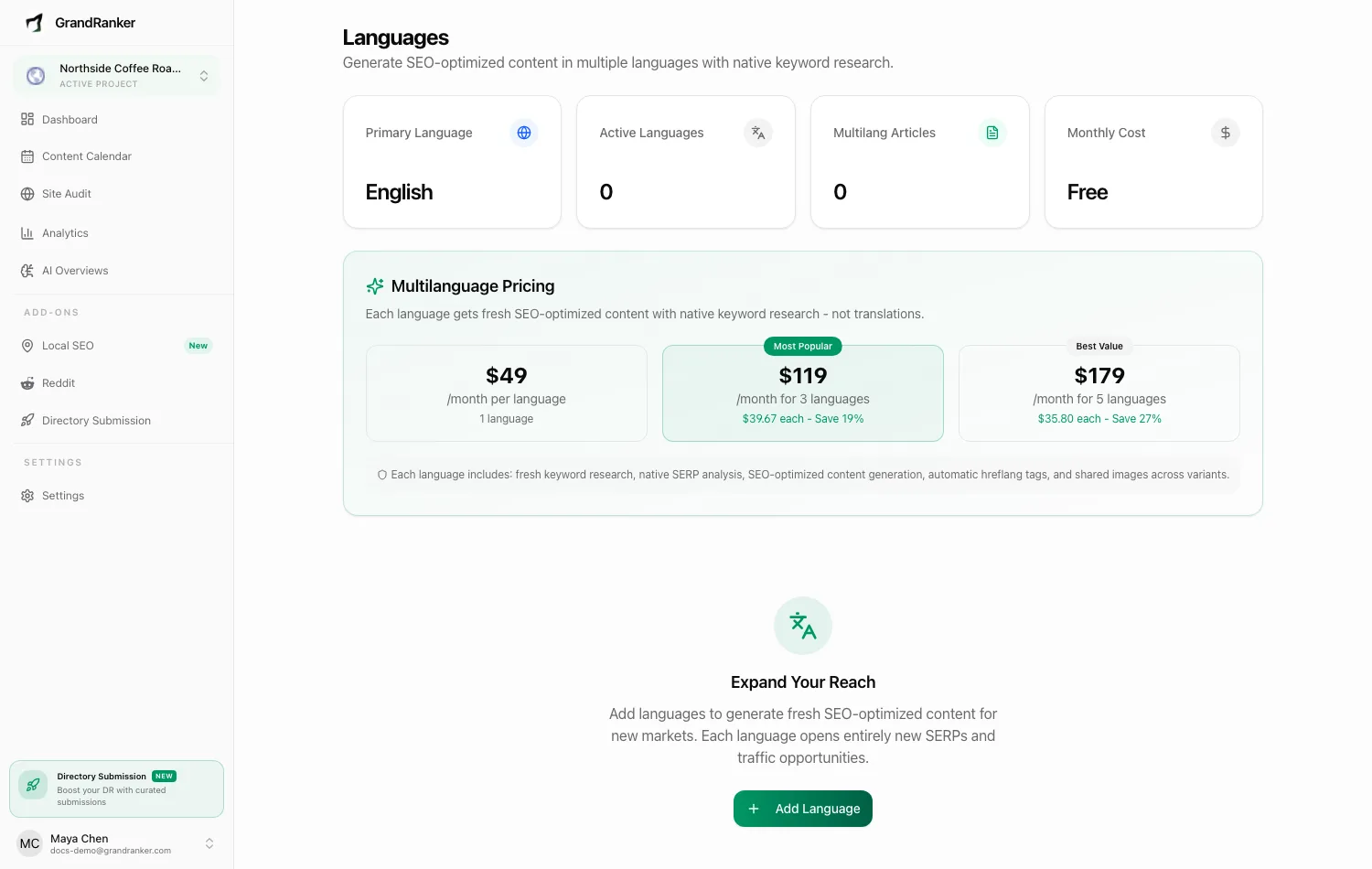
Grandranker can write for more than one market. The Languages screen (Languages in the app, at /languages) lets you add extra content languages to a website. Each added language gets fresh, SEO-optimized articles built on native keyword research for that market (not machine translations of your existing posts).
Your website's primary language is set during onboarding (the Content Language field) and can be changed later in General Settings. The Languages screen is for adding languages on top of that primary one.
How multilanguage content works
When Grandranker finishes a new article in your primary language, it automatically queues a matching article for every active extra language:
- A language-specific keyword is created for the same topic.
- The article pipeline researches and writes it natively in that language. Same topic, new research, not a translation.
- All language versions of an article are linked as one group, and published versions get automatic
hreflangtags plus anx-defaultpointing at the primary version. - Non-primary versions publish under a language-prefixed URL (for example
/de/blog/your-slug) through the same integration as your primary articles.
Images are shared across language variants, so you don't pay for the same visuals twice.
Adding a language
- Open Languages and click Add Language.
- Search or browse the list. Each row shows Language, Market Size, Competition, Quality, and an Add action.
- Click Add on the language you want. It becomes active immediately and new content starts flowing on the next generated article.
The Quality column shows how strong AI content generation is for that language: Excellent, Good, or Adequate. Major languages like Spanish, French, German, Portuguese, Japanese, and Chinese are in the top tier.
Pricing: each language adds $49/month to your subscription. Bundles bring the per-language price down: $119/month for 3 languages and $179/month for 5. You'll see the exact monthly cost on the Languages screen before and after adding.
Managing active languages
Each active language shows as a card with its status (Active or Paused), quality tier, article and keyword counts, and when content was last generated. Three actions are available:
- Pause: stops generating new content in that language. Billing continues; use Remove if you want to stop paying.
- Resume: picks generation back up.
- Remove: cancels billing for that language and stops new content. Existing articles in that language are preserved and stay published.
The four stat cards at the top summarize your setup: Primary Language, Active Languages, Multilang Articles, and Monthly Cost.
FAQ
Are extra languages translations of my English articles?
No. Each language runs the full pipeline natively: keyword research, SERP analysis, and writing.
Questions? Contact us at [email protected].