Key Takeaways
- What Makes a Backlink: What Makes a Backlink Toxic and Why AI Matters
- How AI Analyzes Backlink: How AI Analyzes Backlink Signals Better Than Manual Review
- Using a Toxic Backlink Checker: Step-by-Step Process
- Understanding Your Backlink Toxicity: Understanding Your Backlink Toxicity Score
- Running a Backlink Audit: Running a Backlink Audit for Your Domain
- How to Disavow Backlinks: The Right Way
What Makes a Backlink Toxic and Why AI Matters
A toxic backlink is a link pointing to your website from a low-quality, spammy, or irrelevant source that can harm your search rankings. These links come from domains with poor reputation, unnatural link patterns, or content that violates Google's guidelines. Search engines view them as signals of bad site quality, not endorsement.
Toxic backlinks damage your domain authority and can trigger manual penalties from Google. They dilute the value of your good links and make it harder to rank for competitive keywords. Many websites accumulate toxic backlinks without realizing it, especially if they've been online for years or operated in competitive niches where spammers target them.
This is where AI for identifying toxic backlinks becomes essential. Manual review of hundreds or thousands of backlinks is slow and unreliable. AI tools scan link profiles at scale, flag suspicious patterns, and score each backlink's quality in seconds. GrandRanker helps teams save analysis time by using AI to detect toxicity signals that human reviewers might miss.
AI systems analyze dozens of factors simultaneously: domain authority, spam scores, anchor text relevance, link velocity, referring site content quality, and geographic relevance. They catch subtle red flags that indicate a backlink is more liability than asset.
How AI Analyzes Backlink Signals Better Than Manual Review
Manual backlink audits rely on human judgment and spot-checking. You open a spreadsheet, scan domain metrics, and guess which links look suspicious. This approach misses patterns and takes hours per audit.
AI systems use machine learning to identify toxic backlinks with precision. They process millions of data points across your entire link profile. The AI learns what toxic links look like by studying patterns in flagged domains, then applies that knowledge to your backlinks.
Here's what AI catches that manual review often misses:
- Link velocity anomalies: Sudden spikes in new backlinks from low-quality sources signal a spam attack
- Anchor text patterns: Exact-match anchors from unrelated domains trigger toxicity flags
- Content relevance: Links from pages with zero topical connection to your site score as toxic
- Domain network clusters: AI detects when multiple "different" domains are actually part of the same spam network
- Historical domain data: AI tracks whether a referring domain was penalized in the past
A toxic backlink checker powered by AI completes what would take a human analyst days in minutes. The tool assigns each backlink a toxicity score, explains the reasoning, and recommends action.
Using a Toxic Backlink Checker: Step-by-Step Process
Start by gathering your backlink data. Export your link profile from Google Search Console or use a backlink analysis tool. Most AI checkers accept CSV files or connect directly to your domain.
Step 1: Connect your domain Log into your toxic backlink checker. Enter your website URL. The tool connects to your domain and begins scanning your backlink profile.
Step 2: Run the toxicity analysis The AI analyzes each backlink against hundreds of quality signals. This includes domain authority, spam scores, content relevance, and link pattern analysis. The scan typically completes within minutes.
Step 3: Review the toxicity report The tool generates a detailed report showing:
- Total backlinks analyzed
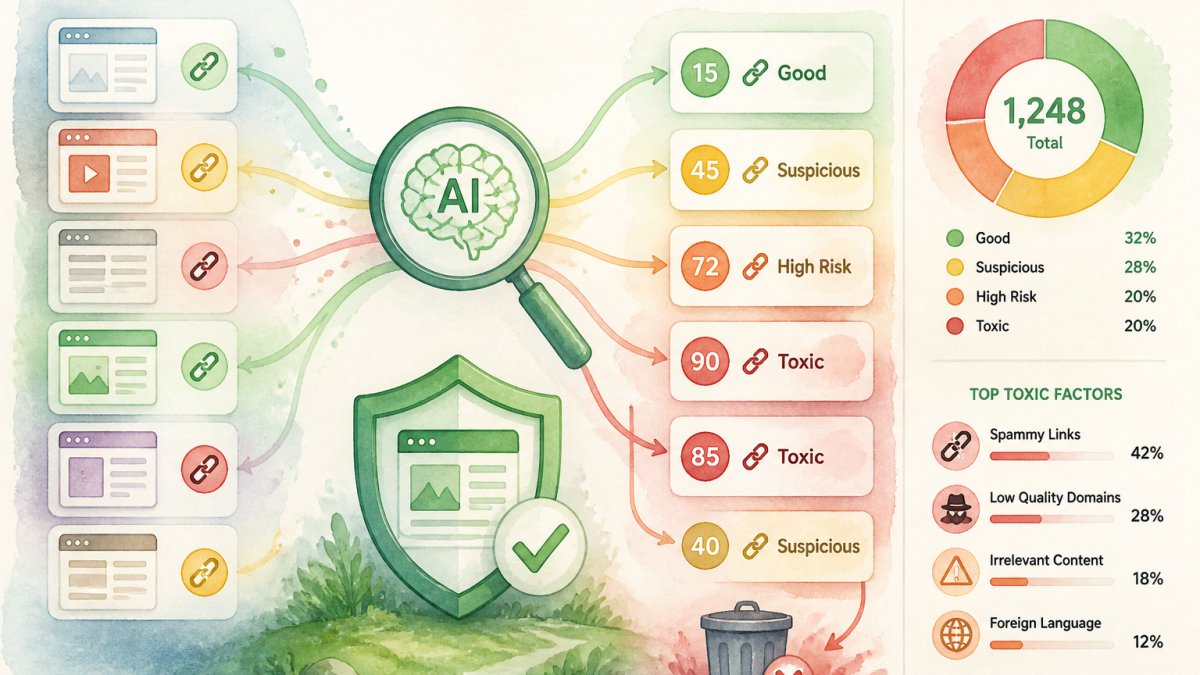
- Count of toxic, suspicious, and clean links
- Individual toxicity scores for each backlink
- Reasons why each link was flagged
Step 4: Prioritize backlinks for disavowal Focus on links with the highest toxicity scores first. The AI ranks them by risk level. Start by disavowing the most damaging links.
Step 5: Create your disavow file Compile a list of domains or URLs you want to disavow. Format it according to Google's requirements: one domain or URL per line, with comments marked by #.
Step 6: Submit to Google Search Console Upload your disavow file through Google Search Console. Google processes the file within days. Your domain stops passing link equity to those toxic sources.
Understanding Your Backlink Toxicity Score
Your backlink toxicity score is a single number representing the overall health of your link profile.
The toxicity score factors in domain authority of referring sites, spam scores, anchor text relevance, link velocity patterns, and content topical alignment. AI recalculates your score as your link profile changes.
Track your toxicity score over time. A rising score means new toxic links are accumulating. A falling score shows your disavowal efforts are working.
Running a Backlink Audit for Your Domain
A backlink audit examines your entire link profile to identify problems and opportunities. It's different from a one-time toxicity check. An audit provides strategic insight into your link-building health.
Start by exporting your complete backlink list. Use Google Search Console, a backlink tool, or your AI platform's export feature. Include all referring domains, not just the top 100.
Segment your backlinks into categories:
- High-quality links: Authoritative domains in your industry with relevant anchor text
- Suspicious links: Low domain authority, spammy content, unrelated topics
- Neutral links: Moderate quality, not helping or hurting much
Use AI to automate this segmentation. The tool scores each link and assigns it to a risk category instantly.
Analyze your high-quality links to understand what's working. These links likely came from:
- Industry publications and directories
- Guest posts on relevant blogs
- Press mentions and media coverage
- Partnerships and collaborations
Replicate these sources for future link building. Focus your outreach on similar domains.
Remove or disavow toxic links aggressively. Don't keep toxic backlinks hoping they'll disappear. Submit them to Google's disavow tool.
Monitor your audit results monthly. New toxic links appear regularly, especially if you're in competitive niches. Quarterly audits catch problems early.
How to Disavow Backlinks: The Right Way
Disavowing tells Google to ignore specific backlinks when calculating your site's authority. It's a powerful tool for removing toxic links from your ranking calculation.
Create a disavow file in plain text format. List each domain or URL you want to disavow, one per line. Use this format:
Disavowed domains and URLs
domain.com example.org/spam-page another-site.net Lines starting with # are comments. Google ignores them.
Disavow entire domains when the domain is entirely spammy. Disavow specific URLs when only certain pages on a domain are problematic.
Submit your file through Google Search Console. Go to the disavow tool under Security & Manual Actions. Upload your text file. Google processes it within days.
Don't disavow legitimate links by mistake. Disavowing good links wastes their value. Review each link carefully before adding it to your disavow list.
Start conservatively. Disavow only the most obviously toxic links first. Monitor your rankings for two weeks. If rankings improve, continue disavowing more suspicious links.
Update your disavow file regularly. As new toxic links appear, add them to your file and resubmit. Google accepts updated disavow files.
Never disavow links from major news outlets, industry publications, or established directories. These are almost always beneficial, even if the anchor text looks odd.
Common Mistakes When Using AI for Backlink Analysis
One major mistake is disavowing too aggressively. Teams see an AI toxicity score and panic, disavowing hundreds of links at once. This can actually hurt your rankings by removing legitimate links from Google's calculation.
Another error is ignoring context. An AI tool might flag a link as toxic because the referring domain has low authority. But if that domain is a local business directory relevant to your service area, the link is probably valuable. Always review the AI's reasoning before acting.
Teams often neglect to monitor results after disavowing. You submit a disavow file and assume the problem is solved. Check your Search Console data two weeks later to confirm your rankings improved. If they didn't, your disavow strategy needs adjustment.
Not updating your disavow file is another common problem. New toxic links appear constantly. Run regular audits, monthly or quarterly, to catch fresh spam links before they damage your profile.
Some teams misunderstand what AI toxicity scores mean. A score of 50 doesn't mean half your links are bad. It means your overall profile has moderate risk. Focus on the specific high-toxicity links, not the overall number.
Failing to distinguish between correlation and causation is also common. Your rankings dropped and your toxicity score rose. But the toxicity might not be the cause. Check if you lost legitimate links, had a technical issue, or faced increased competition.
Don't rely solely on automated toxicity scores. Use them as a starting point. Then manually review the flagged links to understand why they're marked as toxic. Sometimes AI gets it wrong.
Conclusion: Building a Healthier Backlink Profile
Toxic backlinks are a real threat to your search rankings. They accumulate over time and compound the damage. Ignoring them means accepting lower rankings and wasted link-building effort.
AI for identifying toxic backlinks transforms this process from painful manual work into fast, accurate analysis. The technology catches patterns humans miss and scales across thousands of links instantly.
GrandRanker helps teams automate this entire workflow. Our AI platform identifies toxic backlinks, scores your link profile, and recommends disavowal actions, all integrated with your broader SEO strategy. You focus on building quality links while our AI protects your domain authority from spam.
Start a free trial to see how GrandRanker can help identify backlinks that might be impacting your profile. Build a disavowal strategy based on data, not guesswork, and focus on quality links that help you rank.
A healthy backlink profile is foundational to SEO success. Toxic links undermine your efforts no matter how good your content is. GrandRanker's AI-powered backlink analysis identifies and helps you remove toxic links automatically, protecting your domain authority while you focus on building the right connections. Get started free and see how clean your link profile really is.
Ready to dominate search results?
Join 8020+ businesses using GrandRanker to track rankings, fix SEO issues, and grow organic traffic.
Buy NowFrequently Asked Questions
Yes, AI analyzes multiple signals simultaneously—domain authority, link velocity, anchor text patterns, and content relevance—often catching toxic backlinks faster than manual review. However, AI works best when combined with human judgment. False positives can occur, especially with contextual toxicity. Always verify high-risk backlinks before disavowing them.
A reliable backlink toxicity score evaluates domain authority and trust metrics, anchor text relevance and over-optimization, link velocity and timing patterns, referring domain diversity and history, content relevance and topical alignment, and spam indicators like footer links or blog comment patterns.
Run a backlink audit at least quarterly to catch new toxic links early. If you're in a competitive industry or have active link-building campaigns, monthly audits are better. After disavowing a batch of toxic backlinks, audit again 4-6 weeks later to confirm Google has processed your disavow file. Continuous monitoring through AI tools that flag new suspicious backlinks saves time versus waiting for quarterly reviews.
No. Disavow only backlinks that pose real risk: spammy domains, unrelated industries, obvious PBN networks, or suspicious link velocity. Low-toxicity links from marginally weak domains often don't hurt enough to warrant disavowing. Disavowing too aggressively can actually harm your profile if you accidentally disavow legitimate links. Use AI to flag candidates, then manually review the top 50-100 highest-risk links before disavowing.
Continue Reading
More guides to level up your SEO strategy.