Key Takeaways
- Why Automate Blog Content: Why Automate Blog Content with WordPress AI
- WordPress Blog Automation Plugins: WordPress Blog Automation Plugins That Actually Work
- Building Your AI Content Workflow for WordPressStep 1: Choose Your AI Writing ToolStep 2: Connect to Your WordPress SiteStep 3: Set Up Your Automation Rules
- Step 1: Choose Your AI Writing Tool
- Step 2: Connect to Your WordPress Site
- Step 3: Set Up Your Automation Rules
Why Automate Blog Content with WordPress AI
How to automate blog content with WordPress AI has become essential for teams stretched thin on resources. When you automate blog content with WordPress AI, you're not replacing your team, you're multiplying what they can accomplish without burning out.
The core value is simple: AI handles the repetitive parts. Research, first drafts, optimization, even publishing. Your team focuses on strategy, brand voice, and fact-checking.
At GrandRanker, we've watched founders and marketing managers struggle with the same problem. They know content drives organic traffic. They know Google rewards fresh, optimized posts. But they don't have the headcount to publish consistently. Automation solves that constraint without sacrificing quality.
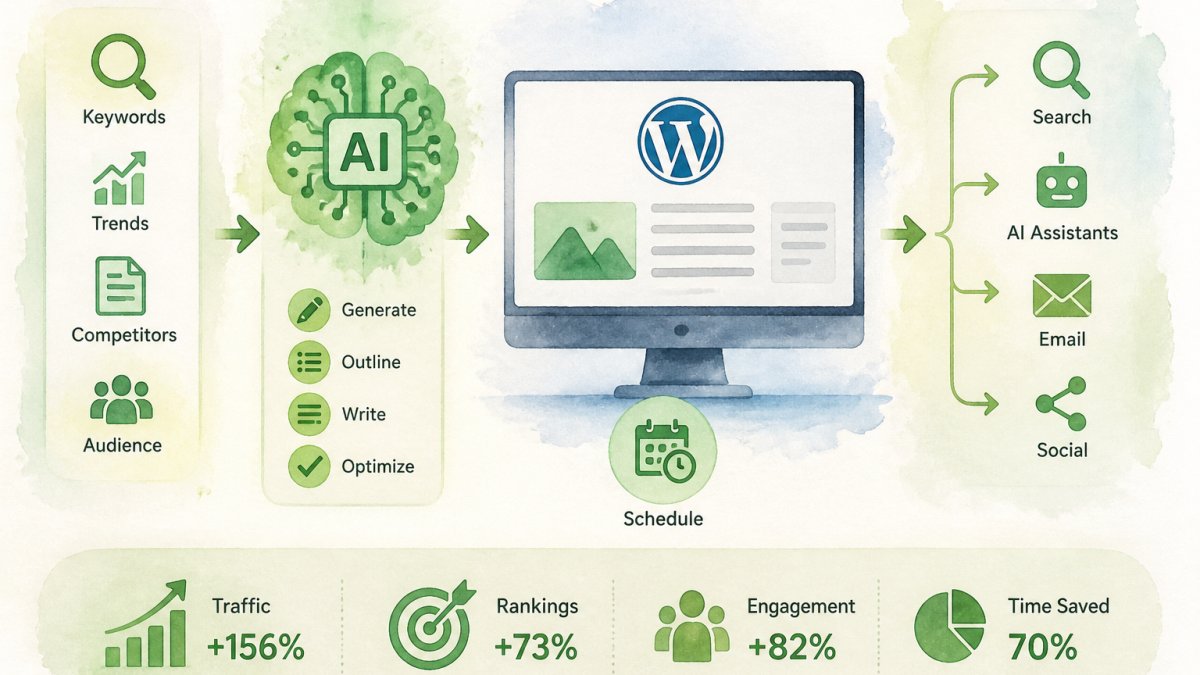
The workflow looks like this: Set up your AI tool. Connect it to WordPress. Define your automation rules. Let it generate, optimize, and publish on schedule. You review quality gates before anything goes live. That's the foundation we'll walk through in this guide.
WordPress Blog Automation Plugins That Actually Work
Several plugins make it possible to automate blog content with WordPress AI, but not all are built the same. Some focus on scheduling. Others handle AI generation. The best ones do both and integrate with your existing tools.
Key capabilities to look for:
- AI writing built in or connected to external models
- Automatic WordPress publishing on schedule
- SEO optimization checks before posting
- Content calendar and workflow management
- Integration with your keyword research tool
The plugins that work best combine a clean interface with real automation power. You want something that doesn't require constant tweaking. Set it once. It runs reliably.
GrandRanker integrates with WordPress to handle the full cycle: keyword research, content generation, optimization for Google and AI assistants, and automated publishing. The difference is you're not managing separate tools. Everything feeds into one workflow.
When evaluating WordPress blog automation plugins, test the setup process first. If it takes hours to configure, you've already lost momentum. The best tools get you publishing within minutes.
Building Your AI Content Workflow for WordPress
Setting up automation requires three core steps: choosing your AI tool, connecting it to WordPress, and defining what triggers publication. This section covers each one in detail.
Step 1: Choose Your AI Writing Tool
Your AI writing tool is the engine. It generates the first draft. It should understand your topic, match your brand voice reasonably well, and integrate with WordPress.
Most AI writing tools work through APIs. You send them a topic, keyword, or outline. They return formatted text. The better ones let you specify tone, length, and structure. Some have built-in SEO scoring.
When choosing, ask: Does it integrate with WordPress directly, or do you need a middle layer? Can you customize the output style? Does it handle your niche topics, or does it produce generic content? A tool built for SaaS blogs might struggle with technical compliance writing.
Test with real content first. Generate a few posts in your actual topic area. Read them. Does the voice feel like your brand? Are the facts accurate? Does it need heavy editing or light touch-ups?
Step 2: Connect to Your WordPress Site
Most AI tools connect via API key. WordPress can't talk to the AI tool natively, so you'll use a plugin or custom integration to bridge them.
The process is straightforward: Get your API key from the AI tool. Install a WordPress plugin that supports that tool (or use n8n, Zapier, or Make for custom workflows). Paste the API key into the plugin settings. Test the connection.
Some plugins offer visual builders. You drag and drop to set up the workflow. Others require code. Choose based on your comfort level. Even non-technical founders can set this up using no-code tools.
Once connected, the AI tool can read from WordPress and write back to it. Content flows automatically from generation to publishing.
Step 3: Set Up Your Automation Rules
Automation rules define when and how content gets published. They're the logic layer between your AI tool and WordPress.
Common rules include:
- Trigger: Every Monday at 9 AM, generate a post on [topic]
- Input: Use keywords from my research tool
- Output: 1,500-2,000 word post, optimized for Google
- Destination: Publish to WordPress as draft (for review) or live
- Metadata: Add category, tags, featured image
Most automation platforms let you set these without code. You're essentially saying: "When X happens, do Y."
The key is starting simple. One automation rule. One trigger. One outcome. Once that works reliably, add more. Complexity later. Reliability first.
How to Automate WordPress Posts with AI
The actual process of automating WordPress posts with AI breaks into two phases: generation and publishing.
Generation phase: The AI tool receives input (topic, keywords, style guide). It generates a draft post. This typically takes 2-5 minutes depending on length. The output lands in your WordPress drafts or an external folder.
Publishing phase: You or your team reviews the draft. Check facts. Verify links. Read for brand voice fit. If it passes, you publish. If it needs edits, you make them before going live.
Most teams add a human review step before live publication. That's quality control. It's also where you catch factual errors or tone mismatches that AI might miss.
For high-volume automation, some teams set thresholds. If the AI-generated post scores above 80 on their internal quality checklist, it publishes automatically. Below that, it goes to a human queue. This balances speed with safety.
The workflow you choose depends on your risk tolerance. News sites need more review. Internal blogs can run looser. Find the balance that fits your brand.
WordPress AI Auto-Publishing: Setting Quality Gates
Auto-publishing without safeguards is risky. A quality gate is a checkpoint before content goes live. It prevents bad posts from reaching your audience.
Common quality gates include:
- Minimum word count (ensure posts are substantial)
- SEO score thresholds (check keyword density, readability)
- Fact-check flags (highlight claims that need verification)
- Brand voice scoring (does it sound like us?)
- Link validation (are external links working?)
Set these gates in your automation tool. Most plugins let you define pass/fail criteria. Posts that fail stay in draft. Posts that pass publish automatically.
For WordPress AI auto-publishing, consider a two-tier approach. First gate: automated checks (word count, SEO, broken links). Second gate: human review for high-stakes content (product announcements, compliance topics).
This approach keeps routine content moving while protecting your reputation on sensitive topics.
Common Pitfalls and How to Avoid Them
Most automation failures come from skipping the setup phase or ignoring quality gates.
Pitfall 1: Not testing the workflow first Many teams enable automation before testing a single post. Then they discover the AI tool doesn't understand their niche. Or the WordPress connection breaks. Or the formatting is wrong. Test thoroughly before going live.
Pitfall 2: Ignoring brand voice AI-generated content often sounds generic. It uses corporate language, passive voice, and hedging. If you don't provide a style guide to your AI tool, every post will sound like it was written by a different person. Give the tool clear voice instructions.
Pitfall 3: Publishing without review Automation is fast, but it's not perfect. Factual errors, outdated information, or tone mismatches slip through. Always review before publishing, especially early on. Once you trust the system, you can loosen review gates.
Pitfall 4: Automating low-value topics Not all topics deserve automation. Automate high-volume, evergreen content. Leave niche, strategic topics to your team. A post about "how to reset your password" is a good automation candidate. A post about your product roadmap is not.
Pitfall 5: Forgetting to update automation rules Your business evolves. Your voice changes. Your keyword strategy shifts. Automation rules get stale. Review them quarterly. Update tone guides. Refresh keyword lists. Treat automation as a living system, not a set-and-forget tool.
Measuring ROI from Your Automated Blog
Measuring ROI from automated content means tracking what matters: traffic, leads, and ranking improvements.
Key metrics to watch:
- Organic traffic: Sessions from Google to automated posts
- Keyword rankings: Position improvements for target keywords
- Engagement: Time on page, scroll depth, bounce rate
- Conversions: Leads or sales from automated content
- Cost per acquisition: Compare automation cost to leads generated
Early posts establish a baseline. Later posts show the trend. If automated content outperforms your historical average, automation is working.
Track these metrics in Google Analytics or your SEO platform. Create a dashboard. Review it monthly. Adjust your automation rules based on what's working.
The ROI calculation is simple: Cost of automation tool divided by revenue generated from automated content.
Automating blog content with WordPress AI is a competitive advantage for teams. You grow your content output without proportionally growing your team. GrandRanker makes this process easier by handling keyword research, content creation, optimization, and publishing in one platform. Start with a single automation workflow. Test it. Measure results. Scale from there. The teams that win aren't the ones publishing more posts manually, they're the ones publishing smarter posts on autopilot. Start your free trial with GrandRanker today and see how automation can transform your content engine.
Ready to dominate search results?
Join 8020+ businesses using GrandRanker to track rankings, fix SEO issues, and grow organic traffic.
Buy NowFrequently Asked Questions
Yes. AI tools integrated with WordPress—either through plugins or API connections—can generate, format, and publish posts automatically. However, best practice is to set up review gates so you approve content before it goes live. This protects your brand voice and ensures quality meets your standards. Most automation workflows include a draft-to-publish delay that gives you time to edit.
Popular options include Zapier for workflow automation, n8n for custom integrations, and native AI plugins built into SEO platforms. The right plugin depends on your existing tools—if you use GrandRanker for keyword research and content planning, you can automate the entire pipeline from research through publishing. Check your platform's WordPress integration documentation to confirm compatibility.
Track performance through Google Analytics and your WordPress dashboard. Monitor metrics like organic sessions, average time on page, and conversions from organic traffic. Set up UTM parameters on automated posts so you can segment performance by automation source. Compare traffic growth before and after automation launches. Most platforms provide built-in reporting; if not, use Google Search Console to see which automated posts rank and drive clicks.
Automation is safe when you implement quality controls. Always review AI-generated content before publishing—check for factual accuracy, brand alignment, and SEO quality. Set up staging environments to test workflows first. Ensure your AI tool respects your content guidelines and compliance requirements. Start with a small batch of automated posts, measure results, and refine your process before scaling to full autopilot publishing.
Continue Reading
More guides to level up your SEO strategy.