Key Takeaways
- Why Validate Schema Consistency: Why Validate Schema Consistency Matters
- What You'll Need Before: What You'll Need Before You Start
- Step 1: Audit Your Current Schema Against Standards
- Step 2: Use JSON Schema Validation Tools
- Step 3: Identify and Fix Common Schema Validation Errors
- Schema Markup Testing Best: Schema Markup Testing Best Practices for Ongoing Validation
Why Validate Schema Consistency Matters
Broken schema is invisible until it costs you rankings. Google's March 2026 core update made structured data eligibility stricter, meaning inconsistent schemas now directly impact search visibility. If your JSON data doesn't match what you declared, search engines skip it entirely.
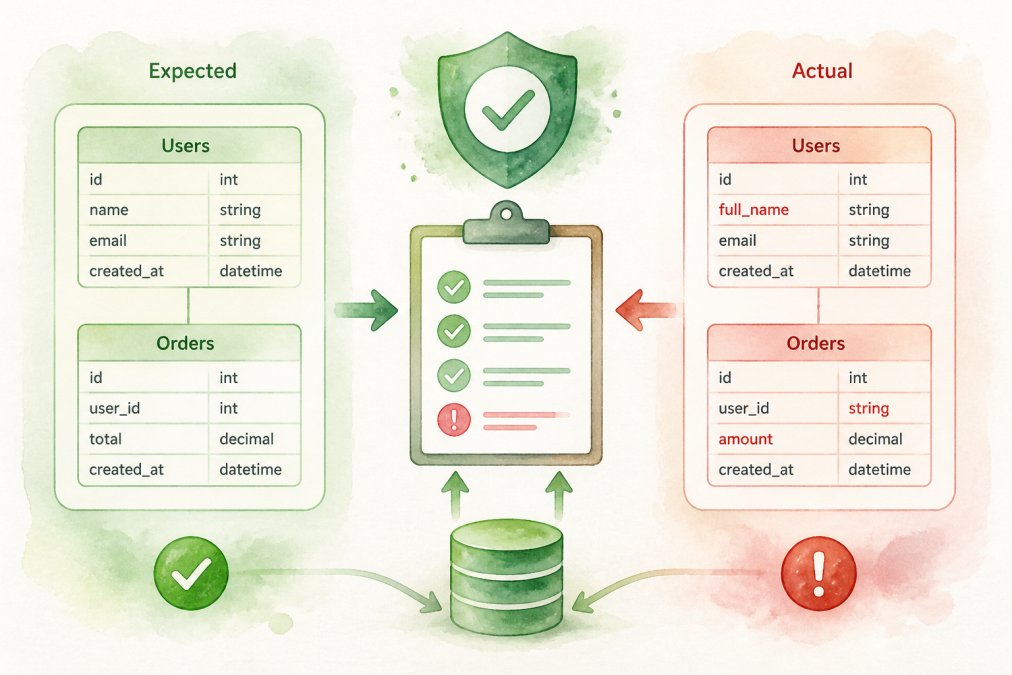
The real problem isn't complexity, it's drift. Your schema works fine on day one. Six months later, your development team adds fields without updating the schema definition. A third-party integration starts sending unexpected data types. Suddenly, validation fails silently and your rich snippets disappear from search results.
According to Nature's Schema Validation and Evaluation Framework research, systematic validation using frameworks like SVEF can assess extracted schemas and identify structural inconsistencies before they impact production systems. At GrandRanker, we've observed that teams that validate schema consistency maintain stable search visibility, while those that skip it often see their traffic drop without understanding why.
The cost of ignoring this is straightforward. Inconsistent schemas mean:
- Rich snippets stop displaying
- AI systems can't reliably cite your structured data
- Search engines downrank pages with malformed markup
- Future updates break without warning
Validating schema consistency isn't optional anymore, it's foundational to SEO performance in 2026.
What You'll Need Before You Start
You'll need three things to validate schema consistency effectively: a clear understanding of your target schema, a validation tool, and access to your actual implementation.
First, define what "correct" means for your use case. Are you validating FAQ schema, product schema, article markup, or something else? Each schema type has different requirements. JSON Schema specifications provide the formal rules, you can reference json-schema.org for standard schema definitions to understand exactly what fields are required versus optional.
Second, choose a validation approach. Most teams use JSON Schema validators (which check structure against a formal schema definition) combined with Google's Rich Results Test (which checks Google-specific requirements). Some also add anomaly detection to catch unexpected data patterns that pass structural validation but look wrong.
Third, gather your implementation samples. Pull actual JSON-LD markup from your pages, API responses from your systems, or database exports, whatever represents your real data. Validating against synthetic examples won't catch the errors that matter.
For teams in Ljubljana and across the region managing distributed systems, validation becomes even more critical when multiple teams or locations contribute data. A single inconsistent source can break validation for your entire dataset.
Step 1: Audit Your Current Schema Against Standards
Start by documenting what schema you're currently using and comparing it to the published standard.
Export a sample of your current schema, at least 20-50 records if you have that volume. For website markup, use your browser's developer tools to inspect the JSON-LD in your page source. For API-driven data, export a representative batch from your production system.
Next, get the official schema definition. For common types like Article, Product, or Organization schema, Google's documentation is authoritative. For custom or less common schemas, reference the schema.org specification or your own internal schema documentation.
Compare field-by-field. Look for:
- Missing required fields
- Fields with wrong data types (string instead of number, for example)
- Inconsistent formatting (some prices as "$50", others as "50")
- Null or empty values where data should exist
Document every deviation. Don't assume it's a problem yet, just catalog what differs from the standard. This audit becomes your baseline for validation.
Step 2: Use JSON Schema Validation Tools
Once you know what's supposed to match, run your data through a validator.
The most direct approach uses JSON Schema validators. These tools check your actual data against a formal schema definition and report exactly which records fail and why. Research from NeurIPS on validation failure feedback systems with 9,558 real-world JSON schemas found that treating validation failures as actionable feedback significantly improves schema management over time.
Popular options include:
- Ajv (JavaScript): Fast, widely used, handles complex schemas
- jsonschema (Python): Simple to integrate into data pipelines
- Online validators: Paste your JSON and schema definition, get instant feedback
- Google's Rich Results Test: Checks how Google specifically interprets your markup
Start with Google's tool if you're validating for search. It's free and shows exactly how Google sees your structured data. For deeper technical validation, use a JSON Schema validator to catch structural errors that Google's tool might not flag.
Run validation on a representative sample first, not your entire dataset. Fix issues in that sample, then expand to full validation. This prevents overwhelming yourself with thousands of errors from a single root cause.
Step 3: Identify and Fix Common Schema Validation Errors
Most validation failures fall into a few categories. Knowing them helps you fix problems faster.
Type mismatches are the most common. Your schema says a field should be a number, but your system sends a string. Price fields often have this problem: "50" (string) instead of 50 (number). Fix this by converting the data type before it reaches your schema output.
Missing required fields happen when your data source doesn't populate something the schema demands. If Product schema requires an image URL but your product doesn't have one, validation fails. Either add the missing data or use a schema that matches your actual data availability.
Inconsistent formatting breaks validation even when the data type is correct. Dates as "2026-09-04" work; dates as "September 4, 2026" don't. Phone numbers with or without dashes, URLs with or without trailing slashes, currency symbols, these small variations cause failures. Standardize before validation.
Null or empty values where the schema expects content. A product with no description, an author with no URL, a rating with no value. Decide whether to provide the data or remove the field entirely.
Unexpected nested structures occur when you add fields that don't belong in the schema, or nest data differently than the schema expects. If the schema expects author.name as a string but you send author as an object with nested properties, validation fails.
Fix errors in this order: first, add missing required data or remove the field. Second, convert data types to match the schema. Third, standardize formatting. Finally, remove unexpected fields.
After fixing, re-validate the same records. Confirm they now pass before moving to the next batch.
Schema Markup Testing Best Practices for Ongoing Validation
One-time validation isn't enough. Your data changes, systems update, and new errors creep in. Build validation into your ongoing workflow.
Set up automated validation in your deployment pipeline. Before any schema markup goes live, run it through validation. If it fails, block the deployment. This catches errors before they reach production.
For existing content, validate on a schedule. Weekly or monthly validation catches drift early. Use tools that emphasize combining deterministic validation (checking against rules) with statistical anomaly detection to catch unexpected patterns that pass structural validation but look wrong.
Monitor validation metrics over time. Track how many records pass, which error types appear most often, and whether errors cluster in specific data sources. This pattern analysis reveals systemic issues, a particular integration always sends wrong data types, a specific team's content consistently has missing fields.
Test schema changes before deploying them. If you update your schema definition, validate your existing data against the new schema first. You might find that thousands of records now fail because the new schema is stricter.
Document your schema version. As your schema evolves, track which version applies to which content. This prevents confusion when troubleshooting old versus new markup.
Common Mistakes to Avoid When Validating Schema
Most teams make predictable errors when starting schema validation. Knowing them saves time.
Validating only new content is the first mistake. Your old pages have schema too, and they're probably inconsistent. Validate everything, not just recent additions. You'll find the biggest problems in your oldest content.
Ignoring warnings in favor of errors is the second. Validation tools report errors (things that definitely break) and warnings (things that might cause issues). Teams often fix errors but ignore warnings. Warnings usually become errors later. Fix both.
Not validating after integrations change is the third. You add a new CMS plugin, switch email providers, or update your e-commerce platform. Each change can alter how schema is generated. Validate after every significant system change.
Using outdated schema definitions happens when you copy schema from an old article or tutorial. Schema specifications evolve. Google adds new fields, deprecates old ones, or changes requirements. Always reference the current standard, not a version from 2024 or earlier.
Fixing symptoms instead of causes is the most expensive mistake. You see 500 records with missing prices and manually add them. Two weeks later, 500 more are missing prices because you didn't fix the system that generates price data. Find the root cause, usually in your data source or generation logic, and fix that instead.
Validating without a plan to fix failures wastes effort. You run validation, get a report showing 10,000 errors, then don't know what to do. Before you validate, decide: which errors are critical? Which can wait? Who fixes them? How long do you have? Validation is only useful if you act on the results.
Conclusion
Schema consistency is no longer a nice-to-have optimization. After Google's March 2026 core update, inconsistent schema directly impacts search rankings and AI citability. Teams that validate schema consistency maintain stable visibility; teams that skip it watch traffic decline without understanding why.
The process is straightforward: audit your current schema, run it through validation tools, fix the errors systematically, and integrate validation into your ongoing workflow. Start with a sample, not your entire dataset. Fix root causes, not symptoms. Make validation automatic in your deployment pipeline.
GrandRanker helps automate this process by validating schema consistency across your content automatically, ensuring your structured data stays aligned with search engine requirements and AI citation standards. This means your content ranks reliably and gets cited by ChatGPT and other AI assistants consistently. Start your free trial with GrandRanker today and stop worrying about schema drift breaking your visibility.
Ready to dominate search results?
Join 8020+ businesses using GrandRanker to track rankings, fix SEO issues, and grow organic traffic.
Buy NowFrequently Asked Questions
A: Schema consistency ensures your structured data accurately represents your content, which helps search engines understand and rank your pages correctly. Google's March 2026 core update expanded validation requirements for structured data, making consistency directly tied to search eligibility and rankings. Inconsistent schema can confuse search engines and cause rich results to be removed from display, reducing click-through rates and organic traffic.
A: The most effective JSON schema validation tools include Google's Rich Results Test, Schema.org validators, and programmatic validation frameworks. Tools that combine deterministic validation (checking against predefined rules) with anomaly detection offer strong protection. Choose tools that support your specific schema types—FAQ, Product, Organization, or custom schemas—and integrate with your testing workflow for continuous monitoring.
A: Common errors include missing required fields, incorrect data types, invalid enum values, and constraint violations (like maxItems limits). The Schema Validation and Evaluation Framework (SVEF) provides a systematic approach to identifying these issues. Fix errors by reviewing your schema definition against the official specification, testing with validation tools, and implementing constraints like maxItems to enforce structural integrity.
A: Validate schema consistency as part of your regular testing cycle—ideally during development, before publishing updates, and monthly for ongoing monitoring. A robust data consistency program combines deterministic validation with historical baseline analysis to catch drift over time. Automated validation during deployment prevents errors from reaching production and ensures your schema remains compliant with current standards.
Continue Reading
More guides to level up your SEO strategy.